Quick start
This page is the shortest path from credentials to a working integration. By the end you will have one webhook, in your handler, for a payment you made against an invoice you created.
That single loop exercises the whole integration in miniature: authentication, a write into Paystand, a payer action, and an event coming back. Everything you build afterward is a variation on it. Budget about thirty minutes in sandbox.
Work through the steps in order — each one depends on the one before it. The API Reference has the field-by-field detail, and you will want it open alongside.
Before you begin
| You need | Where it comes from |
|---|---|
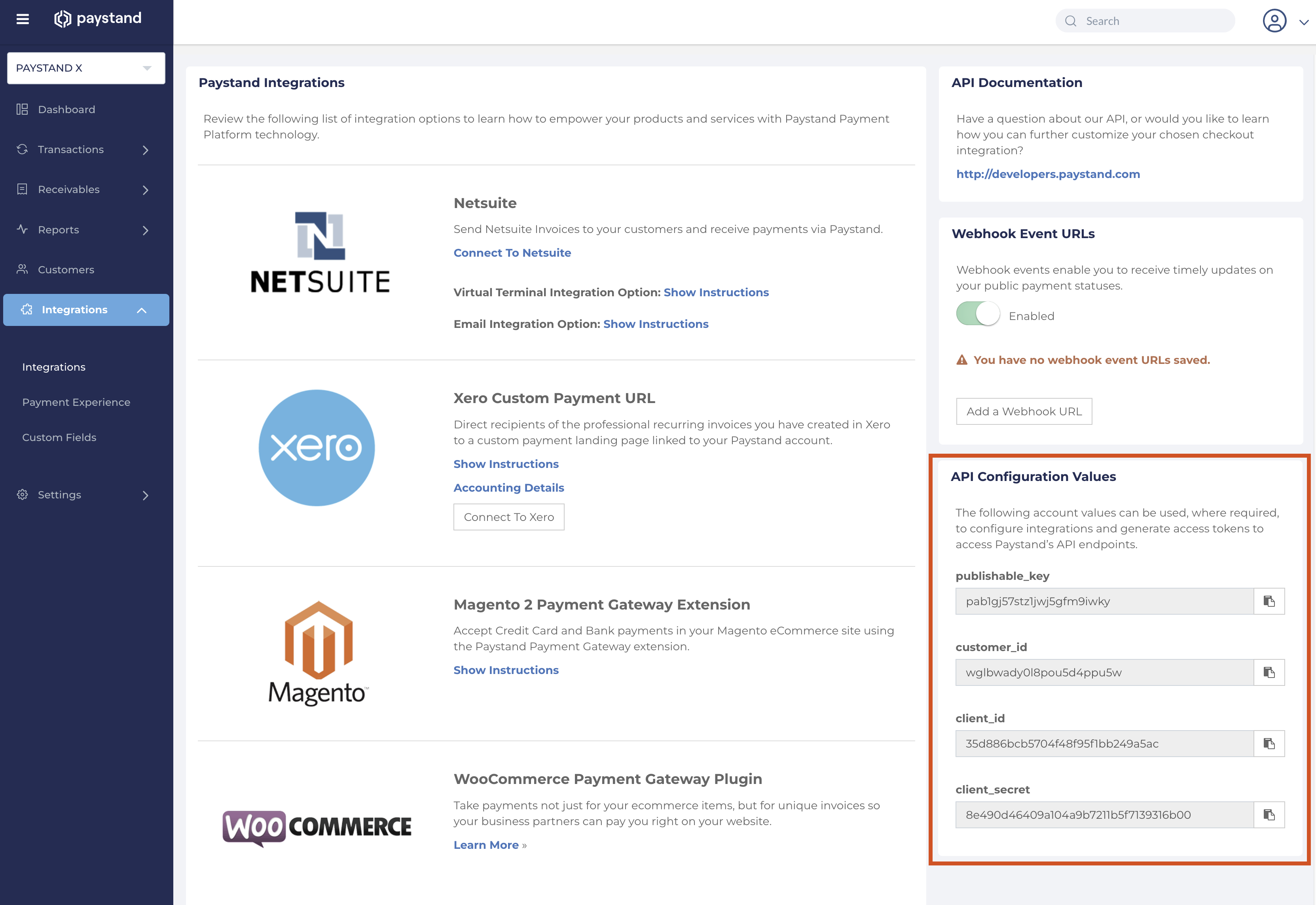
client_id, client_secret, customer_id | Dashboard → Integrations. Sandbox and production are separate sets. |
| A public HTTPS endpoint for webhooks | Your own service, or webhook.site / ngrok for the first run. Plain HTTP and self-signed certificates are rejected. |
| A sandbox dashboard login | Your Paystand contact. You need the UI to send the invoice and pay it. |
| Environment | Base URL |
|---|---|
| Sandbox | https://api.paystand.co/v3 |
| Production | https://api.paystand.com/v3 |
Do all of this in sandbox. A sandbox token is invalid in production and vice versa, and the test cards below are rejected outright in production.
Two headers, not one. Every authenticated call needs both Authorization: Bearer <token> and X-CUSTOMER-ID: <customer_id>. Omitting X-CUSTOMER-ID returns 401 Unauthorized — exactly the same status as a bad token. If your first call 401s and you are certain the token is fresh, this is almost always why.
Step 1 — Get an access token
POST https://api.paystand.co/v3/oauth/token
Content-Type: application/json
Accept: application/json

{
  "grant_type": "client_credentials",
  "client_id": "<client_id>",
  "client_secret": "<client_secret>",
  "scope": "auth"
}
Worked when: 200 with access_token, token_type: "Bearer", and expires_in: 1209600.
That is fourteen days. Refresh on a schedule — roughly every thirteen days — rather than fetching a token per request. A naive integration works for two weeks and then fails silently in production.
See Access Token for the full contract.
Step 2 — Create a customer
The customer must exist before any receivable can point at it.
POST https://api.paystand.co/v3/payerCustomers
Authorization: Bearer <access_token>
X-CUSTOMER-ID: <customer_id>
Content-Type: application/json

{
  "extCustomerId": "TEST-001",
  "customerName": "Acme Dental Group",
  "email": "ap@example.com",
  "contactFirstName": "Dana",
  "contactLastName": "Reed"
}
extCustomerId is your system's customer ID, up to 40 characters, unique per merchant. Paystand deduplicates on it and it comes back on every webhook, so use the real ERP primary key rather than something invented for the test. A second create with the same value is rejected rather than duplicated — use Update Customer to change an existing one.
Worked when: 200 and the response contains an id. Keep that id — it is Paystand's internal UUID, and it is what path parameters want later.
See Create Customer.
Step 3 — Create a receivable
POST https://api.paystand.co/v3/receivables/create
Authorization: Bearer <access_token>
X-CUSTOMER-ID: <customer_id>
Content-Type: application/json

{
  "extCustomerId": "TEST-001",
  "erpId": "TEST-INV-1001",
  "erpRef": "INV-1001",
  "totalAmount": "100.00",
  "amountDue": "100.00",
  "currency": "USD",
  "postingDate": "2026-09-15",
  "dueDate": "2026-10-15",
  "status": "active"
}
Two fields carry your identity and they are not interchangeable, and both are required. erpId is the internal invoice key, never shown to the payer. It can be changed later with Update Receivable (send the full body), but every webhook matches on it, so treat a change as a deliberate re-key. erpRef is the human-readable invoice number the payer sees.
Link the customer with either extCustomerId or payerCustomerId, never both. amountDue must be less than or equal to totalAmount. API currency is USD or CAD today.
Worked when: 200 with an id, amount of 100.00, amountPaid of 0, and status: "active".
Every receivable field you send comes back under a different name
This is the most common source of "the response is missing the field I just sent". Nothing is missing — it is renamed on write.
| You send | It comes back as |
|---|---|
erpId | extId |
totalAmount | amount |
amountDue | amountPaid, as totalAmount − amountDue |
postingDate | date |
dueDate | dateDue |
erpRef | not returned on create |
So an invoice that is fully unpaid comes back with amountPaid: 0, not amountDue: 100. There is no amountDue, totalAmount, or erpId on any response or webhook — only on the way in. To get the outstanding balance, compute amount − amountPaid.
status is derived rather than echoed back: Paystand returns paid when nothing remains and active otherwise. Creating a receivable with amountDue: 0 therefore comes back as paid, which is occasionally a surprise during historical backfills.
See Create Receivable.
Step 4 — Attach the invoice PDF
POST https://api.paystand.co/v3/receivables/<receivableId>/attachments
Authorization: Bearer <access_token>
X-CUSTOMER-ID: <customer_id>
Content-Type: multipart/form-data

attachment=@invoice-1001.pdf
One file per call, 20 MB each. Send PDFs: when your account enforces PDF-only attachments, the file content must be a PDF — the extension is not checked. The three-attachment limit is enforced on files sent with Create Receivable, not on this upload.
Worked when: 200 with object: "receivableAttachment" and a name matching your original filename.
Confirm with GET /v3/receivables/<receivableId>/read, which should now list it under attachments. Use the /read suffix when fetching a single receivable — bare GET /v3/receivables/<receivableId> also resolves, but returns a different, older field set. /read gives you the same shape that create returned, which is what you want to assert against.
See Upload Attachment.
Step 5 — Register your webhook, then pay the invoice
Register the endpoint in Dashboard → Integrations → Webhook Event URLs.
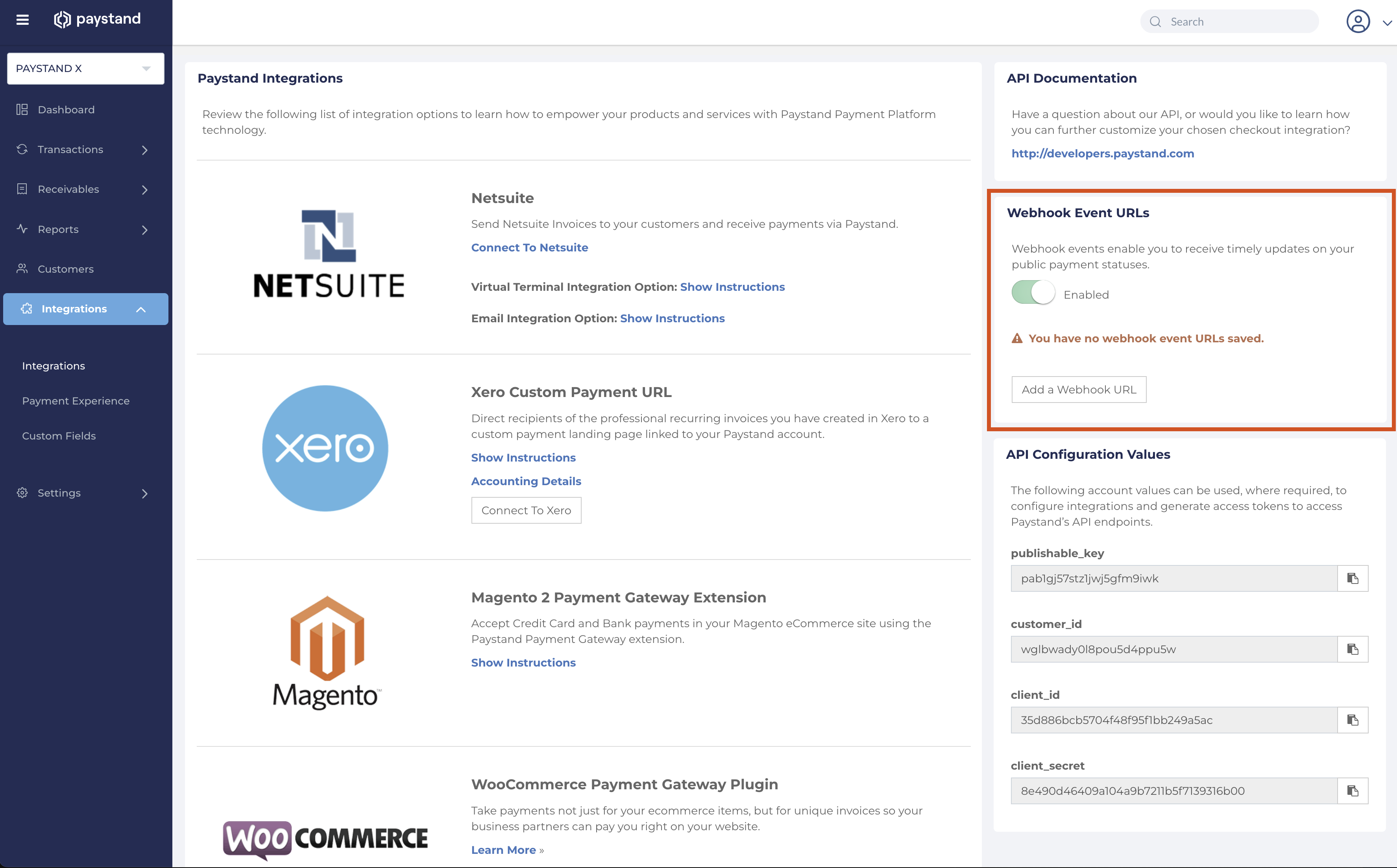
Every registered URL receives every event — there is no per-URL filtering. Use one handler and route internally on resource.object, not on which URL was hit. Full detail in Webhook Setup.
Then, from the merchant dashboard, send the receivable to the test payer and pay it with card 4242424242424242, any future expiry, any CVC.
Step 6 — Confirm the events landed
A card payment on an invoice produces four event families, and not necessarily in this order:
| Event | What it tells you |
|---|---|
| Payment | created → processing → posted → paid. resource.amount is the gross the payer was charged. |
| Receivable Transaction | The payment was applied to a specific invoice. resource.receivable.extId is your invoice key; amountApplied is what landed on it. |
| Fee | Paystand's merchant processing fee. Either an immediate paystand event, or a delayed one followed later by the real amount. |
| Transfer | The payout to the bank. processing → sending → posted → paid. |
Timestamps are authoritative; arrival order is not. Do not build logic that assumes Payment lands before its Receivable Transaction.
Worked when: your handler logged a Payment event reaching paid, and a Receivable Transaction whose receivable.extId is TEST-INV-1001. That is the loop closed.
Cross-check through the API with GET /v3/receivables/<receivableId>/transactions. Each item matches the webhook payload shape, wrapped in the standard list envelope — { results, count, settings }, not a bare array. Every list endpoint behaves the same way and accepts limit (default 50), offset, and order. Use this for reconciliation and outage backfill, not as a substitute for webhooks.
Waiting on a Transfer event? Use card 4000000000000077 instead. Funds skip the holding period and go straight to available balance, so the payout chain fires the same day. Otherwise you will wait for real settlement timing and conclude that transfers are broken. More fixtures in Testing Credentials.
Run it as a Postman collection
Every call above, in order, with tests that capture the IDs as they come back:
Download the Paystand X Quick Start collection
Import it, fill in clientId, clientSecret, and customerId from Dashboard → Integrations, and run it. The first request mints the token and a fresh run ID, so the collection is safely re-runnable — each run creates a new customer and invoice instead of colliding on IDs that Paystand deduplicates. You will need to pick a local PDF for the attachment step, and pay the invoice in the dashboard between the last two requests.
Build it with an AI assistant
Using Claude Code or another Agent Skills tool? Install the Paystand X API skill so your assistant knows the steps above, the webhooks, and the common gotchas while you build.
Five things that will bite you
The gross and the applied amount are different numbers. On a $100 invoice with a $3 convenience fee, payment.amount is 103.00 but receivableTransaction.amountApplied is 100.00. Both are correct. Use amountApplied against the invoice and derive the payer fee from payment.feeSplit.payerTotalFees, with feeSplit.subtotal as the invoice portion. There is no top-level convenienceFee field. See Payment and fee reconciliation.
The convenience fee is not a Fee event. Fee events carry the merchant's processing cost only. The payer-facing fee lives on the payment's feeSplit. Two different fees, two different accounts, two different sources.
A delayed fee has no usable amount. Card fees depend on card tier and are finalized only after the banking partner confirms. Record the amount when feeType is paystand, and overwrite if a later paystand event arrives for the same fee id.
One checkout can produce many Receivable Transaction events. If a payer settles three invoices at once you get three events sharing one paymentId. Sum the amountApplied values. Summing those and the parent payment amount double-counts the money — the most common reconciliation bug on this API.
Delivery is at-least-once. You will receive duplicates; that is the design, not a fault. Deduplicate on the event id before you apply anything. Retries run 5 min, 15 min, 1 h, 12 h, then 24 h four times — eight attempts across roughly four days. A 404 from your endpoint stops retries immediately.
What not to build on day one
Skip polling entirely; subscribe to the events. Skip credit memos, refunds, and disputes until the happy path closes. Skip transfer reconciliation until you have seen a payment land. And do not chase a webhook problem before confirming your endpoint is reachable from the public internet with a valid certificate — that is the cause more often than anything in your code.
Hand each event to a queue and return 2xx within fifteen seconds. Doing the ERP write inline is why most handlers start timing out under load.
Rate limit is 3,000 requests per minute per API key, with limit headers on every response. Retry 5xx and 429 with exponential backoff and jitter. Because writes deduplicate on your external IDs, treat every write as safe to retry — if a retry would worry you, you have a bug.
Related
- ERP integration overview — recommended sync order for a full ERP integration
- Chaining IDs across API calls — which ID to store from each response
- Payment and fee reconciliation — merchant fees vs payer fee splits
- Webhook and REST polling — when polling is the right call
- Bank reconciliation — matching payouts to deposits
- Testing Credentials — test cards, ACH fixtures, bank logins
- Not supported today — known gaps before you design around them
- Build with an AI assistant — install the Paystand X API skill (beta)